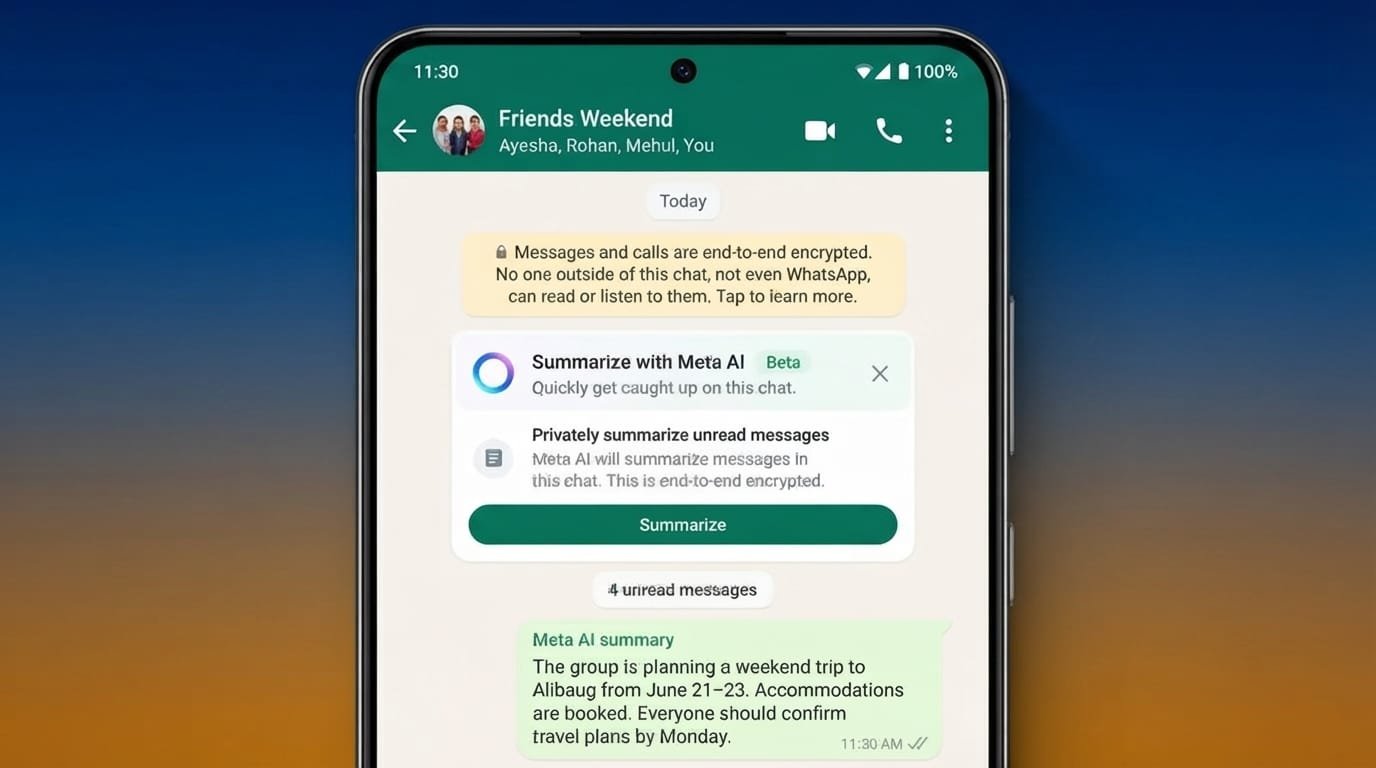
WhatsApp is adding more AI-powered features that can make everyday chatting easier and more personal. Two of the most interesting additions are Message Summaries and AI-powered chat themes.
Message Summaries are designed to help users catch up with unread conversations without going through every message. AI chat themes, meanwhile, give users more ways to change the appearance of their conversations.
Here is a closer look at how these features work and what they offer.
Also Read: How to Use Pattern Lock Screen – Time Password App
WhatsApp Message Summaries for Long Conversations
Keeping up with busy WhatsApp groups can be difficult, especially when dozens or hundreds of messages arrive while you are away. Reading everything from the beginning is not always practical.
Message Summaries are designed to make this easier.
Instead of opening every unread message, users can get a short overview of the conversation. The feature uses Meta’s AI technology to identify the main points and present them in a more manageable format.
This can be particularly useful for active group chats. For example, if several people discuss plans, share updates, or ask questions while you are offline, a summary can help you understand the general discussion before you decide which individual messages to read.
The feature can also be useful in one-to-one conversations where several unread messages have accumulated.
How Message Summaries Work
When the feature is available, users can access a summary of selected unread messages through WhatsApp. The exact options may vary depending on the version of the app, account, language, and region.
WhatsApp has also described privacy protections around its AI processing. Its Private Processing approach is intended to allow certain AI features to work without giving WhatsApp or Meta direct access to the content being processed.
However, users should always check the privacy information shown in their own WhatsApp app because feature availability and implementation can change over time.
Message Summaries are also designed as an optional feature rather than something users have to use for every conversation. This gives people more control over when AI assistance is used.
💬 Get WhatsApp Chat History
Disclaimer: This tool is for educational/demo purposes only. It does not access real WhatsApp data.
Why Message Summaries Can Be Useful
The main benefit is simple: saving time.
Instead of spending several minutes going through a busy conversation, users can quickly get an idea of what they missed. This can be helpful during a busy day when there is not enough time to read every message.
The feature may be especially useful for:
- Busy family group chats
- Work-related conversations
- Community groups
- Event planning
- Travel discussions
- Large group conversations
Users can then open the original messages when they need more detail.
AI Chat Themes and Wallpapers on WhatsApp
WhatsApp is also giving users more control over how their conversations look.
Chat themes allow people to change elements such as the chat background and message bubble appearance. AI-powered wallpaper options can take this customization a step further by helping users create more personalized designs.
Instead of using only the standard wallpapers included with WhatsApp, users can describe the type of background they want and, where the feature is supported, use AI to generate a design based on that idea.
For example, someone might want a wallpaper inspired by a:
- Misty forest
- Night sky
- Tropical beach
- Minimal workspace
- Colorful celebration
- Peaceful mountain landscape
The generated results can then be adjusted by changing the description or trying another idea.
Different Themes for Different Chats
One useful part of chat customization is the ability to give individual conversations their own appearance.
For example, someone could choose a calm background for a personal conversation and a more colorful design for a friends’ group. A work-related chat could have a simple and less distracting theme.
This makes it easier to visually distinguish conversations without changing how the messaging features themselves work.
AI-generated wallpapers are mainly about personalization. They do not change the actual messages or add new communication features to a chat.
WhatsApp Chat Themes on Mac
WhatsApp has also been working on expanded chat customization for its Mac application.
Users who receive the relevant version of the feature can find additional theme options within the desktop app. These options can combine different background designs with matching message bubble colors.
Manual customization can provide even more flexibility. Depending on the version available to a user, there may be several color and appearance options to choose from.
Another useful option is applying different styles to individual conversations. This allows users to create a separate look for personal, family, or work chats.
Themes Can Be Different Across Devices
Chat appearance does not necessarily have to look identical everywhere.
Depending on how the feature is implemented, users may be able to maintain different visual preferences on their desktop and phone. Someone who prefers a darker appearance while working on a Mac can therefore use a different style on their mobile device.
Feature availability can vary between WhatsApp versions and operating systems, so users may not see the same options immediately.
A More Personal WhatsApp Experience
These features show how WhatsApp is moving beyond basic messaging and adding more tools for convenience and personalization.
Message Summaries focus on understanding conversations faster, while AI chat themes focus on making conversations look more personal.
For people who regularly deal with large group chats, summaries can reduce the time needed to catch up. For users who enjoy customizing their apps, AI wallpapers and chat themes provide more creative options.
At the same time, AI features should always be used with an understanding of the privacy information and controls provided by WhatsApp.
Also Read: How to Clear Call History on Android: A Simple Step-by-Step Guide
Final Thoughts
WhatsApp’s Message Summaries and AI-powered chat customization bring different types of improvements to the messaging experience.
Message Summaries can make it easier to catch up on long or busy conversations, while AI wallpapers and chat themes let users create a look that matches their preferences.
The availability of these features can depend on the device, app version, account, language, and region. As WhatsApp continues updating its AI and customization tools, more users may gain access to additional options over time.
For now, these features offer a useful combination of convenience, personalization, and greater control over the way WhatsApp conversations are experienced.